 Boris Tane
 Railway activity feed filters and cron jobs in the CLI
Explore with AI
Railway announced three changes on 16 October 2026: activity feed filters by service and activity type, `railway cron list` and `railway cron run` for checking and triggering cron runs from the terminal, and a guided `railway config migrate` flow from railway.json or railway.toml to infrastructure as code. The feed also now shows variable changes, image auto-updates, volume operations and services being added or removed. Run `railway upgrade`, link your cron service, and start with `railway cron list`.
On this page
- What the activity feed filters and cron commands are
- Who each change is for
- Filtering the activity feed to one service
- Checking cron runs from the terminal with railway cron list
- Reading run statuses, and why runs show SKIPPED
- Triggering a run off-schedule with railway cron run
- Scripting cron checks in CI and with a coding agent
- Moving from railway.json to IaC with the guided migration
- What goes wrong with Railway cron jobs and the IaC migration
- Catching broken Railway cron jobs without running the commands yourself
- Common questions
Railway shipped three related changes on 16 October 2026. The activity feed can now be filtered by service and activity type. Two new CLI commands, railway cron list and railway cron run, show recent cron executions and trigger a run outside the schedule. A guided railway config migrate flow moves services from Config as Code to an infrastructure as code (IaC) authoring file.
All three help with the same job: working out what changed and what ran, then acting on it, from the dashboard or a terminal. This guide covers each one in the order most teams will use them: the feed to see changes, the cron commands to check jobs, and the migration, which has a deadline.
What the activity feed filters and cron commands are
The activity feed is the dashboard’s running list of events in a Railway project: deploys, config changes and the like. Filters let you cut that list down to the services and event types you pick. A Railway cron job is a service with a crontab schedule: Railway starts it on schedule, it does one task, and it exits. The cron commands are a terminal view of that service’s run history, plus a way to start a run now.
The changelog entry is titled “Activity feed filters, guided IaC migration, cron jobs in the CLI”. It covers:
- Activity feed filters. Filter by service and by activity type. Open the feed from a service to see only that service, or pick services in the project feed. Service icons and colours show which service each event belongs to.
- New events in the feed. Image auto-updates, variable changes, volume operations, and services being added or removed now show up. Before this update the feed did not show them.
- Cron jobs in the CLI.
railway cron listshows recent executions with status, start time and duration, plus the schedule and the next run.railway cron runasks for confirmation, then queues an execution. - Guided IaC migration.
railway config migrategenerates an IaC file fromrailway.jsonorrailway.toml. New subcommands handle the switch:cutover,statusandundo. - Fixes. CDN setting changes now land in the environment’s pending changes for review. Cache purges still apply immediately. CDN caching settings can be defined in the IaC file and reviewed with
railway config plan. The Config as Code migration now keeps build settings and handles services that share one config file.
The cron and migration commands ship in the CLI, so update first:
railway upgradeWho each change is for
- Teams with busy projects. If one environment holds several services, the old feed made you scan every event to find one service’s changes. Filters fix that.
- Anyone running Railway cron services. Until now, the Cron Runs tab in the dashboard was the place to see run history. The CLI commands bring that workflow to the terminal, to CI scripts and to coding agents.
- Anyone still on railway.json or railway.toml. Railway’s IaC docs mark Config as Code as deprecated. Existing Config as Code files stop being read on 2026-12-01, and new services can’t opt into it. If you have these files, the migration is the change that matters most.
Filtering the activity feed to one service
The feed lives in the dashboard. The announcement covers no CLI or API access to it, so this part is point and click.
- Open the service you care about and open the activity feed from there. The feed shows only that service’s activity.
- To compare a few services, open the project feed and choose the services you want.
- Filter by activity type to narrow it to the event kind you suspect, for example variable changes.
Using the new event types to answer what changed
The events Railway added are the ones that often explain a broken service with no new deploy:
- Variable changes. Someone rotated a database URL or removed a key the job reads.
- Image auto-updates. The image under the service moved while nobody pushed code.
- Volume operations. A volume was attached, detached or changed.
- Services added or removed. A dependency disappeared from the project.
When a cron job starts crashing, filter the feed to that cron service and to variable changes first. A job that ran fine for weeks and then fails on the next scheduled run, with no deploy in between, usually traces back to one of these events.
Checking cron runs from the terminal with railway cron list
The command group mirrors the Cron Runs tab in the dashboard. Both subcommands target the linked service by default.
- Update and link the directory to your project and the cron service:
railway upgrade
railway link- List recent runs:
railway cron listRailway’s docs show output like this:
Cron runs for worker in production
Schedule: 0 0 * * * (at 00:00), next run in 14 hours

  STARTED                     STATUS        DURATION      DEPLOYMENT
  2026-10-12 02:01:53 +02:00  EXITED        7s            9830309c-4c34-47c5-8841-ddb872e77b07
  2026-10-11 02:02:21 +02:00  EXITED        8s            9830309c-4c34-47c5-8841-ddb872e77b07

Logs for a run: railway logs -s worker --since 2026-10-12T00:01:53Z --until 2026-10-12T00:02:02Z- Copy the last line and run it. It is a ready-made
railway logscommand for the latest completed run. It uses the run’s start and end time, with the end rounded up to the next whole second, so you get that run’s logs and nothing else.
A few details in that output are easy to misread:
- Start times are in your local time zone. Schedules are in UTC. In the example, a
0 0 * * *schedule shows runs starting at 02:01 local time. - Runs drift by a few minutes. Railway does not guarantee execution to the minute.
- A run still in progress shows its elapsed time with a
so farsuffix. - A skipped run shows
previous run still runningnext to the deployment ID.
Targeting another cron service
Pass --service, --environment or --project to look at a service you haven’t linked. --limit sets how many runs to show: the default is 20 and the maximum is 1000.
railway cron list --service worker --environment production --limit 50The target must have a cron schedule, set in service settings or under deploy in a config file. If it doesn’t, the command exits with an error such as Service worker has no cron schedule in environment production.
Reading run statuses, and why runs show SKIPPED
The docs list these statuses:
EXITED: the run finished and the process exited.CRASHED: the run exited with an error.RUNNING: the run is in progress.SKIPPED: the previous run was still in progress, so this one was skipped.CREATED,INITIALIZING,RESTARTING: the run is starting up.STOPPED,REMOVED,REMOVING: the run was stopped or its deployment was removed.
SKIPPED is the one that hides real breakage. Railway does not terminate cron deployments for you. If a run is still going when the next one is due, Railway skips the new run. So a job that leaves a database connection open never exits, and every run after it is skipped. Nothing crashes and no error appears. The fix is in your code: close connections and exit when the task is done.
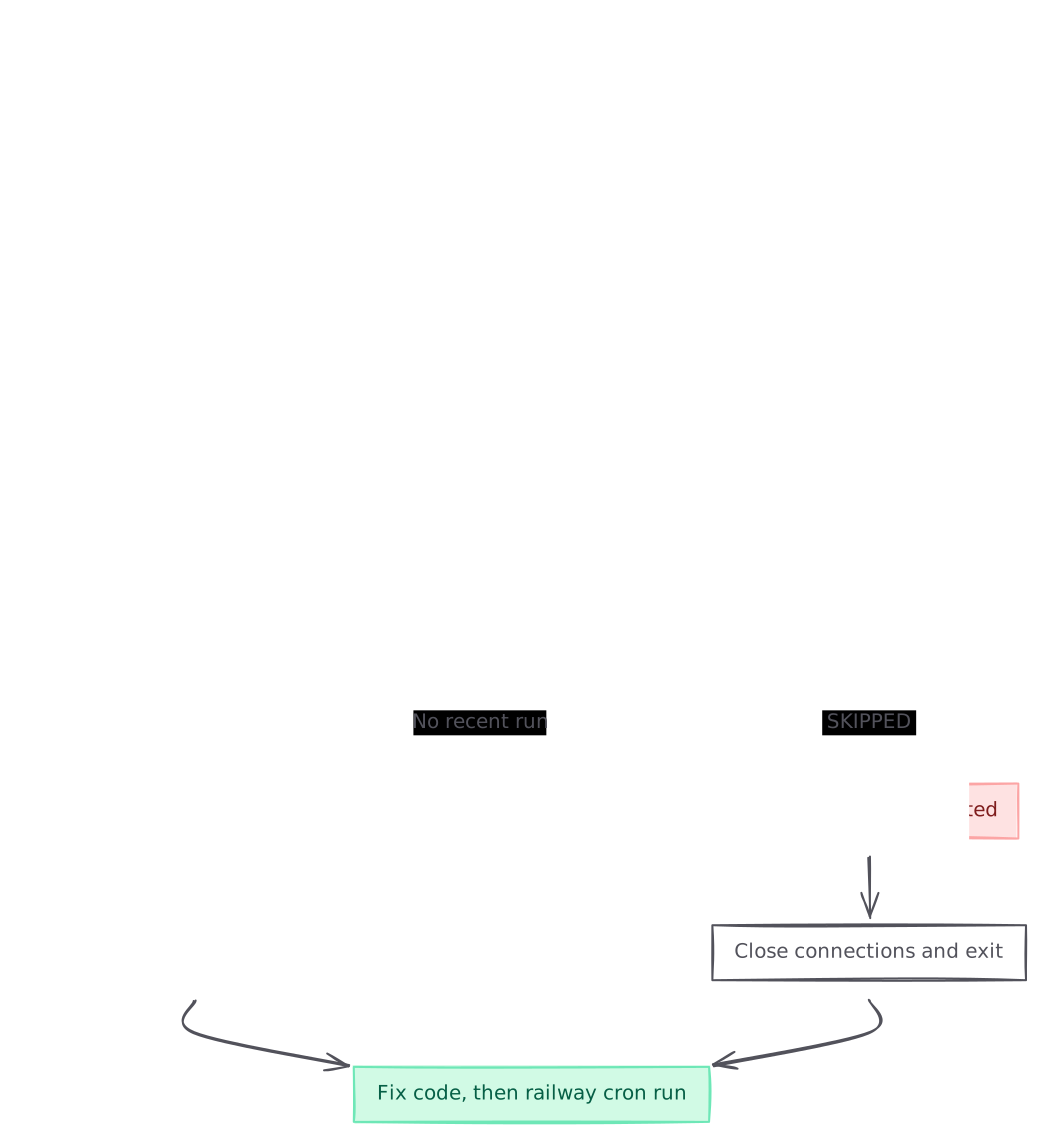
graph TB A[Nightly job did not do its work] --> B[Run railway cron list] B --> C{Latest run status?} C -->|CRASHED| D[Run the printed logs command] C -->|SKIPPED| E[Previous run never exited] C -->|No recent run| F[Check schedule and activity feed] E --> G[Close connections and exit] D --> H[Fix code, then railway cron run] G --> H style E fill:#fee2e2,stroke:#fca5a5,color:#7f1d1d style H fill:#d1fae5,stroke:#6ee7b7,color:#065f46
If no recent run shows up at all, read the schedule line in the header. It describes the schedule in words and says when the next run is due, which catches a UTC offset mistake quickly. Then filter the activity feed to that service to see whether someone changed it.
Triggering a run off-schedule with railway cron run
Use this after a fix, or when a job needs to run now.
railway cron runThe CLI asks for confirmation, then queues the run:
Cron run enqueued for worker. It can take a few minutes to appear in `railway cron list`.The run then shows up in railway cron list alongside scheduled runs. trigger is an alias for run, and ls and runs are aliases for list.
To skip the prompt, pass --yes. When stdout is not a terminal, in CI or in a pipe, --yes is required. Without it the command exits with an error and does not prompt.
railway cron run --service worker --yes
railway cron run --yes --json
The JSON form prints {"success": true}. That means the run was queued. It does not tell you the run succeeded, so check railway cron list afterwards.
Scripting cron checks in CI and with a coding agent
--json on list prints an array of runs, newest first. Each entry has id, deploymentId, status, createdAt, completedAt, durationSeconds and meta. While a run is in progress, durationSeconds and completedAt are null.
Railway’s docs give two scripting examples:
# Status of the latest run
railway cron list --json --limit 1 | jq -r '.[0].status'

# Fail if any of the last 20 runs crashed
railway cron list --json | jq -e 'all(.status != "CRASHED")'
The second line exits non-zero when any run in the window crashed, so you can drop it into a CI job on its own schedule. It does not catch SKIPPED. If a stuck job is your bigger risk, test for that status too:
railway cron list --json | jq -e 'all(.status != "CRASHED" and .status != "SKIPPED")'The announcement also points out that coding agents can run the same commands. Good requests are concrete: check whether the nightly sync succeeded, pull logs from the failed run, or trigger the cleanup job. An agent session isn’t a terminal, so it needs --yes for cron run. Decide up front whether your agent may trigger jobs at all, since a run does real work against real data.
Moving from railway.json to IaC with the guided migration
Config as Code (railway.json or railway.toml) configures one service deployment. IaC describes a whole project environment in one file: .railway/railway.ts, which is generally available, or railway.py and railway.go, which are in beta. A service can’t be managed by both at once. railway config plan stops and names any service that still has to be migrated.
The new flow splits the work into separate steps, so writing the IaC file doesn’t quietly change which file your services read.
- Update the CLI with
railway upgrade, then install the SDK in the repository withnpm install railway. - Run the interactive flow and read the generated file:
railway config migrate- Write the file to disk:
railway config migrate --apply- Check where each service stands:
railway config migrate status- When you’re ready to switch, run the cutover. It lists the affected services, warns about redeployments and inherited environments, and saves the previous config-file paths before switching:
railway config migrate cutover- Preview, then apply:
railway config plan
railway config apply- If something looks wrong, restore the previous config-file paths from the saved snapshot:
railway config migrate undo
graph TB A[railway.json or railway.toml] --> B[railway config migrate] B --> C[Review the generated file] C --> D[railway config migrate --apply] D --> E[railway config migrate status] E --> F[railway config migrate cutover] F --> G[railway config plan] G --> H{Only intended changes?} H -->|yes| I[railway config apply] H -->|no| J[railway config migrate undo] style I fill:#d1fae5,stroke:#6ee7b7,color:#065f46 style J fill:#fee2e2,stroke:#fca5a5,color:#7f1d1d
How migrate handles monorepos and split repositories
In a monorepo, migrate finds every railway.json and railway.toml, including ones in packages, and writes a single .railway/railway.ts. In a project split across repositories, run it in each repository. A single-service migrate writes a named partial export, so each repository owns its own slice of the environment. --service migrates one service, and --lang py or --lang go picks the beta languages.
Reading the plan before you apply
A good migration plan shows only the settings you moved, such as build, start or healthcheck on the migrated service. Stop if it shows deletes for services, variables or buckets you didn’t expect, or changes to unrelated services. To gate CI on drift, railway config plan --detailed-exit-code exits 0 when nothing would change and 2 when changes are pending.
What goes wrong with Railway cron jobs and the IaC migration
These are the mistakes that bite, each with its fix.
- Reading cron times in the wrong zone. Schedules are UTC and
cron listprints local time. Fix: read the schedule line in the header, which states the next run. - Treating SKIPPED as harmless. It means the last run never exited. Fix: close connections in the job and exit when the task ends.
- Scheduling too often. Scheduled runs must be at least 5 minutes apart in UTC, across hour boundaries too.
*/7 * * * *is invalid because the last run of the hour sits 4 minutes before the next hour’s first run. Fix: use*/5or a schedule that divides the hour evenly. cron runfailing in CI. Without a terminal it errors unless you pass--yes. Fix: add--yesin scripts and agent sessions.- Expecting a triggered run to show up at once. The CLI says it can take a few minutes to appear. Fix: poll
cron listand don’t trigger a second run. - Assuming the docs match the announcement on
--apply. The changelog says--applywrites the file without switching services. When we read it, therailway configreference still described--applyas writing the file and clearing Railway Config File settings. Fix: runrailway config migrate statusafter--applyto see what actually changed. - Leaving the migration until December. Config as Code files stop being read on 2026-12-01. Fix: migrate now, while
undoand a working old config give you a way back. - Inlining secrets during import.
railway config pull --include-variablesdecrypts non-sealed values, secrets included, and writes them into the file. Fix: leave the default, which renders existing values aspreserve(). - Running two config systems at once. Plans are blocked for services still managed by
railway.jsonorrailway.toml. Fix: finish the cutover for that service, or remove its old file and clear the custom config path in service settings.
Catching broken Railway cron jobs without running the commands yourself
The CLI answers questions when you ask them. A job that silently stops still needs something watching it. Polylane connects to Railway, so when a scheduled job breaks it works out why and opens a pull request with the fix, ready for your team’s normal review.
Running on Railway? See how Polylane monitors Railway in production.
Common questions.
When did Railway add cron jobs to the CLI?
Railway announced `railway cron list` and `railway cron run` on 16 October 2026, in the same changelog as activity feed filters and the guided IaC migration. Run `railway upgrade` to get them.
How many cron runs can railway cron list show?
20 by default. Pass `--limit` to change it, up to a maximum of 1000. Add `--json` for an array of runs, newest first, that you can pipe into jq.
Why does my Railway cron run show SKIPPED?
The previous run was still running when the next one was due. Railway does not terminate cron deployments, so a process that never exits blocks every run after it. Close database connections and exit once the task is done.
Can I run railway cron run in CI or from a coding agent?
Yes, but pass `--yes`. When stdout is not a terminal, the command exits with an error unless `--yes` is set. `--json` prints `{"success": true}` when the run is queued.
Does railway cron run tell me whether the job succeeded?
No. It confirms the run was queued, and the CLI says the run can take a few minutes to appear. Check the outcome with `railway cron list` and the logs command it prints for the latest completed run.
Can I filter the Railway activity feed from the CLI?
The announcement only describes filters in the dashboard. You can open the feed from a service, or pick services in the project feed and filter by activity type, such as variable changes or volume operations.
When does Railway stop reading railway.json and railway.toml?
Railway's IaC docs give a hard cutoff of 2026-12-01 for existing Config as Code files. New services can't use Config as Code at all. Migrate with `railway config migrate`, then `cutover`, `plan` and `apply`.
How do I roll back a Config as Code to IaC cutover?
Run `railway config migrate undo`. It restores the previous config-file paths from the snapshot that `railway config migrate cutover` saved before it made the switch.
Sources (6)
Boris Tane is the founder of Polylane. He previously founded Baselime, observability for the future of the cloud, which Cloudflare acquired. At Cloudflare he built and led the Workers observability team.
Related
- How to Monitor a FastAPI App on Railway: Logs, Traces and Alerts Set up health checks, JSON logs, OpenTelemetry traces, monitors and crash alerts for a FastAPI service on Railway, with the commands and config to copy.
- Fix Railway “Application failed to respond” (502) Why Railway returns “Application failed to respond” with a 502, how to tell a wrong host, port or target port from a crash or overload, and how to fix each.
- How to monitor a vibe-coded app in production Monitor a vibe-coded app in production: surface swallowed errors, add a health route, tag deploys, watch cron jobs and alert on what users feel first.
- How to correlate incidents with deploys using evidence Learn how to correlate incidents with deploys using release markers, metrics, logs and verified GitHub, Vercel, Cloudflare and Kubernetes change events.
- How to fix a broken build on main How to fix a broken build on main: read the failing job, decide between rerun, revert and fix forward, find the breaking commit and stop the next one.