 Boris Tane
 Fix “Cannot find module axios/dist/node/axios.cjs” on Vercel
Explore with AI
Cannot find module '/var/task/backend/node_modules/axios/dist/node/axios.cjs'Your deployed Vercel Function tried to load axios's CommonJS build, `dist/node/axios.cjs`, and that file is missing from the function bundle. It usually happens because Vercel compiled your handler to CommonJS, so `require('axios')` resolves to `axios.cjs` and that file was left out of the traced files. Add `"type": "module"` to the package.json nearest your function, or rename the handler to `.mjs`, and redeploy; if the code must stay CommonJS, add the file to the bundle with `includeFiles`.
Ongoing incident? Our founding team can help you get your Vercel app back up.On this page
- What “Cannot find module axios.cjs” means
- Why your import becomes a require on Vercel
- Confirm which cause you have
- Fix 1: run the function as an ES module
- Fix 2: keep CommonJS and ship axios.cjs in the bundle
- Fix 3: make axios a real dependency of the function’s package
- Keeping axios.cjs errors out of production
- When Polylane traces a crash like this back to the deploy
- Common questions
This error shows up in the runtime logs of a Vercel Function that works with vercel dev and crashes once deployed. It usually comes with two more lines: Did you forget to add it to "dependencies" in package.json? and Runtime exited with error: exit status 1. The runtime exits with status 1, and the function keeps failing until the missing file is dealt with, whatever route or input it gets.
The hint about dependencies is often wrong. In the original Vercel issue, axios was already in dependencies and axios.cjs was in the local node_modules. The file existed on disk. It was missing from the deployed function.
What “Cannot find module axios.cjs” means
It means Node.js, running inside your deployed function, was asked to load axios’s CommonJS file and could not find it in the function’s files. The path in the message tells you where it looked. Read it from left to right:
/var/taskis the start of the path the runtime searched in the deployed function. Since the error comes from the runtime, it is a different problem from a failed build.backend/is the folder that holds your function and itspackage.json. You only see this segment when the function lives in a subfolder of the repository. Without a subfolder, the path starts/var/task/node_modules/.... The cause and the fix are the same either way.node_modules/axios/dist/node/axios.cjsis axios’s CommonJS build for Node.js.
The axios package.json explains why Node asked for that exact file. The package declares "type": "module". Its exports map gives Node two entry points: require loads ./dist/node/axios.cjs, and import falls through to ./index.js.
"exports": {
  ".": {
    "default": {
      "require": "./dist/node/axios.cjs",
      "default": "./index.js"
    }
  }
}
So a CommonJS require('axios') lands on axios.cjs, and an ES module import lands on index.js. If your function is CommonJS at runtime, it needs axios.cjs in the bundle. If that file was not traced into the bundle, you get this error.
Why your import becomes a require on Vercel
You probably wrote import axios from 'axios'. That still turns into a require in the deployed code. Vercel’s Node.js runtime docs say that to run native ES modules in JavaScript handlers, you use a .mjs file or set "type": "module" in the nearest package.json. Without either, Vercel compiles ES module syntax in .js files to CommonJS.
That is the chain behind the error. Your import is compiled to require('axios'). Node picks the require condition and loads dist/node/axios.cjs. That file is missing from the function bundle, so Node throws. A Vercel maintainer reproduced it on axios 1.3.3 and wrote in the issue that adding "type": "module" to package.json fixes the deploy.
The likely reason local dev hides the problem: vercel dev runs on your machine, where your full node_modules holds every file in the package. The deployed bundle only holds the files that were traced into it.
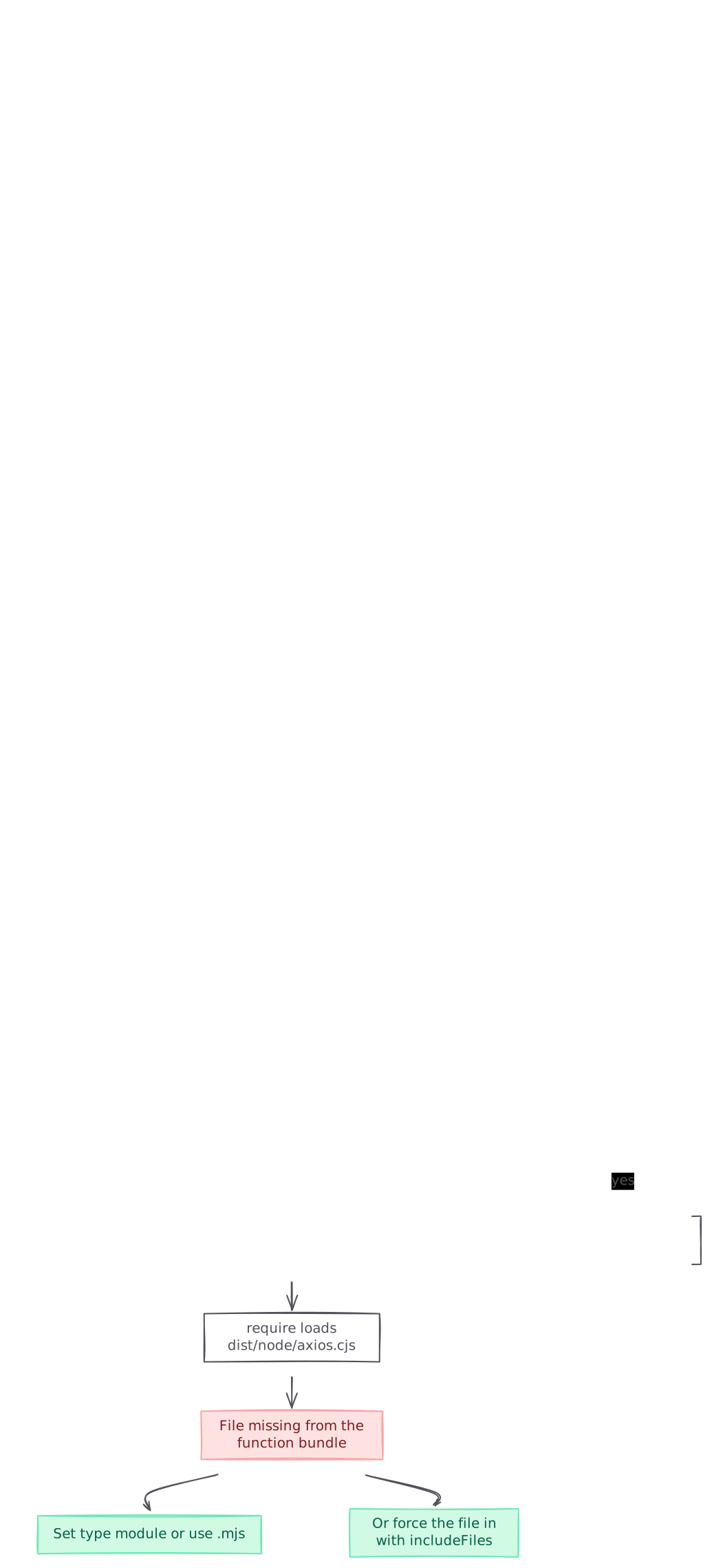
graph TB A[Deployed function crashes on axios.cjs] --> B{axios in this package's dependencies?} B -->|no| C[Add axios to dependencies and commit] B -->|yes| D{Nearest package.json has type module?} D -->|no| E[Vercel compiles the handler to CommonJS] E --> F[require loads dist/node/axios.cjs] F --> G[File missing from the function bundle] G --> H[Set type module or use .mjs] G --> I[Or force the file in with includeFiles] D -->|yes| J[Inspect the build output for axios] style G fill:#fee2e2,stroke:#fca5a5,color:#7f1d1d style H fill:#d1fae5,stroke:#6ee7b7,color:#065f46 style I fill:#d1fae5,stroke:#6ee7b7,color:#065f46 style C fill:#d1fae5,stroke:#6ee7b7,color:#065f46
Confirm which cause you have
Run these from the folder that holds the function’s package.json. That is backend/ if your path has that segment.
Check the module type
node -p "require('./package.json').type"If it prints undefined or commonjs, and your handler is a .js file, Vercel compiles it to CommonJS. That is the most common cause. See the first fix.
Check that axios is a real dependency of this package
node -p "require('./package.json').dependencies?.axios"
npm ls axios
The first command should print a version range. If it prints undefined, axios is only in devDependencies, only in a parent folder’s package.json, or not committed at all. Vercel’s module not found guide says a package installed only on your machine, and never added to package.json, never reaches Vercel’s build. See the third fix.
Look inside the bundle Vercel builds
You can reproduce the deployed bundle on your machine. The vercel build command writes the build artifacts to .vercel/output. Its --standalone option puts every dependency inside the function output folders, so you can search them:
vercel pull --yes
vercel build --standalone
find .vercel/output/functions -path '*axios/dist/node*'
If find prints nothing, axios.cjs is missing from the bundle, which is the same state that crashes in production. Run it again after each fix below. When the file is listed, or the handler no longer needs it, the deploy will load.
Fix 1: run the function as an ES module
This is the fix the Vercel maintainer gave. Once your handler runs as an ES module, Node resolves import axios from 'axios' through the import path to index.js, and never asks for axios.cjs.
- Open the
package.jsonnearest your function. In abackend/layout that isbackend/package.json. The one at the repository root has no effect on that function. - Add the
typefield:{ "name": "backend", "type": "module", "dependencies": { "axios": "^1.3.3" } } - Convert every
.jsfile in that package to ES module syntax. The Node.js packages docs say"type": "module"makes Node load every.jsfile under thatpackage.jsonas an ES module, sorequireandmodule.exportsstop working:// api/fetch-rates.js import axios from 'axios'; export default async function handler(req, res) { const { data } = await axios.get('https://example.com/rates'); res.status(200).json(data); } - If converting the whole package is too big a change, convert only the entry point. Rename
api/fetch-rates.jstoapi/fetch-rates.mjs. Vercel runs.mjshandlers as native ES modules and leaves the rest of the package alone. - Redeploy and call the route:
Expectvercel --prod curl -s -o /dev/null -w "%{http_code}\n" https://your-app.vercel.app/api/fetch-rates200, or the status code your handler returns.
Test with vercel dev once more after the change. The maintainer wrote in the issue that vercel dev support for ESM was “a little spotty” at the time. A route that runs locally and in a preview deployment is the real proof.
Fix 2: keep CommonJS and ship axios.cjs in the bundle
Some codebases cannot move to ES modules yet. In that case, tell Vercel to include the file. The functions block in vercel.json takes an includeFiles glob of files to add to the matched functions:
{
  "$schema": "https://openapi.vercel.sh/vercel.json",
  "functions": {
    "api/**/*.js": {
      "includeFiles": "node_modules/axios/dist/node/**"
    }
  }
}
Put this vercel.json in the project’s root directory, so in backend/ when that folder is the project. Run vercel build --standalone and the find command again to check the file is now in the bundle.
The same vercel.json docs say includeFiles is not supported in Next.js, and point to outputFileTracingIncludes in next.config.js for that case. The Next.js output docs say its keys are route globs and its values are glob patterns resolved from the project root:
// next.config.js
module.exports = {
  outputFileTracingIncludes: {
    '/api/*': ['./node_modules/axios/dist/node/**'],
  },
};
Keep the glob as narrow as the one above, so the trace only gains the files the function needs.
Importing the .cjs path directly
The answer marked as accepted on Vercel’s discussion was to import the file by its full path:
const axios = require('axios/dist/node/axios.cjs');This works on Vercel because the tracer now sees an explicit file to include. It only works locally if your installed axios lists that subpath in its exports map. The Node.js packages docs say a subpath missing from exports throws ERR_PACKAGE_PATH_NOT_EXPORTED, so with an older axios the direct path can fail in vercel dev. Current axios lists ./dist/node/axios.cjs in exports. Check your installed version:
node -p "require('axios/package.json').exports['./dist/node/axios.cjs']"If that prints ./dist/node/axios.cjs, the direct path works in both places. Treat it as a stopgap all the same. It ties your code to axios’s internal folder layout, and Fix 1 or includeFiles leave your imports alone.
Fix 3: make axios a real dependency of the function’s package
If the checks above showed axios is missing from the function’s own dependencies, the hint in the error is right this time.
- Install it into the package that holds the function:
cd backend npm install axios - Commit both
package.jsonand the lockfile. The Node.js runtime docs say Vercel picks the install command from the lockfile it finds:package-lock.jsonrunsnpm install,pnpm-lock.yamlrunspnpm install,yarn.lockrunsyarn install, and a Bun lockfile runsbun install. - Check that axios sits under
dependencies. A package listed only underdevDependenciesis the wrong place for code the function loads at runtime. - Check that it is in the package Vercel builds, which is not always the repository root.
- Redeploy and run the
findcheck against the new build.
Keeping axios.cjs errors out of production
This class of error only shows up in the deployed bundle, so the checks that catch it have to look at that bundle.
- Check the bundle in CI. Run
vercel build --standaloneand fail the job if a file your functions need is missing:vercel build --standalone find .vercel/output/functions -path '*axios/dist/node*' | grep -q . || exit 1 - Smoke test every preview deployment. Call each function route on the preview URL before you promote it. A crash at module load fails the first request, so one call per route is enough.
- Read dependency upgrades closely. The error comes from how a package declares its entry points in its
package.json, and those declarations can change between releases. Pin axios and read the diff of itsmainandexportsfields when a bot bumps it. - Pick one module system per package. A package with
"type": "module"and ES module syntax throughout never asks for a dual package’s CommonJS build. That removes this class of failure for every dual package you depend on. - Alert on failed function invocations. Your own error handling may never see a crash like this, so watch the runtime logs for the
Runtime exited with errorline and alert on it.
The same pattern hits any package that ships separate CommonJS and ES module builds. If the path in your error names a different package’s .cjs file, the checks and fixes above still apply. Swap in that package’s name.
When Polylane traces a crash like this back to the deploy
Polylane detects production issues and fixes them by opening pull requests. It connects to Vercel, so when a function starts crashing on a missing module, it works out why, and the fix arrives ready for your team’s normal review.
Running on Vercel? See how Polylane monitors Vercel in production.
Common questions.
Why does it work with vercel dev but fail after deploying?
The likely explanation is that vercel dev runs on your machine, where your full node_modules holds every file axios ships, while the deployed function only holds the files traced into its bundle. If your handler is compiled to CommonJS and axios.cjs was not traced, the require fails only in production. Run vercel build --standalone and search .vercel/output/functions to see the deployed state on your machine.
Axios is already in dependencies. Why does the error ask if I forgot to add it?
The hint is generic. The runtime prints it for any missing module. In the original Vercel issue, axios ^1.3.3 was in dependencies and axios.cjs existed locally. The file was simply absent from the deployed bundle, so check the module type of your package first.
Do I put type module in the root package.json or backend/package.json?
Put it in the package.json nearest the function. Vercel's Node.js runtime docs say native ES modules need a .mjs file or type module in the nearest package.json. If your error path contains /var/task/backend/, that means backend/package.json.
Will adding type module break my other files?
The Node.js packages docs say it makes Node load every .js file under that package.json as an ES module, so any file using require or module.exports will fail. Convert them to import and export, or limit the change by renaming only the handler to .mjs, which Vercel runs as a native ES module.
How do I fix this in a Next.js app on Vercel?
includeFiles in vercel.json is not supported in Next.js. Vercel's vercel.json docs point to outputFileTracingIncludes in next.config.js, and the Next.js output docs say its keys are route globs and its values are file globs, for example './node_modules/axios/dist/node/**' for '/api/*'. Keep the glob narrow so the trace only gains the files the route needs.
Is importing axios/dist/node/axios.cjs directly a safe fix?
It works on Vercel, and it works locally only when your installed axios lists ./dist/node/axios.cjs in its exports map. When it doesn't, Node throws ERR_PACKAGE_PATH_NOT_EXPORTED in vercel dev. Current axios does list it, but the path ties your code to the package's internal layout, so prefer type module or includeFiles.
What does the caller see when this happens?
The runtime exits with status 1, so the invocation fails, and every request to that function fails the same way until you deploy a fix. Open the request in the runtime logs to read the Cannot find module line and the path it names.
I see the same error for a different package. Does this page apply?
Yes, if the path ends in a .cjs file from a package that ships both CommonJS and ES module builds. Run the same three checks: the module type of your package, whether the package is in dependencies, and whether the file appears under .vercel/output/functions after vercel build --standalone.
Sources (11)
- Serverless Function crashing due to Cannot find module axios.cjs (vercel/vercel issue 9769)
- Serverless Function crashing due to Cannot find module axios.cjs (vercel/vercel discussion 9637)
- Using the Node.js Runtime with Vercel Functions (Vercel Docs)
- Static Configuration with vercel.json (Vercel Docs)
- How do I resolve a module not found error? (Vercel Knowledge Base)
- vercel build (Vercel CLI Docs)
- output (Next.js Docs)
- Modules: Packages (Node.js Docs)
- axios package.json (axios on GitHub)
- Polylane documentation
- Polylane full content
Boris Tane is the founder of Polylane. He previously founded Baselime, observability for the future of the cloud, which Cloudflare acquired. At Cloudflare he built and led the Workers observability team.
Related
- Fix Vercel “FUNCTION_INVOCATION_FAILED” 500 errors Why a Vercel Function returns 500 FUNCTION_INVOCATION_FAILED, how to find the crash in runtime logs, and how to fix throws, missing env vars, files and memory.
- Fix Vercel “MIDDLEWARE_INVOCATION_FAILED” errors Why Vercel returns 500 MIDDLEWARE_INVOCATION_FAILED or EDGE_FUNCTION_INVOCATION_FAILED, how to find the failing middleware in logs, and how to fix it.
- Fix “TypeError: fetch failed” on Vercel and Next.js Why Node.js throws TypeError: fetch failed on Vercel, how to read err.cause to find the real error, and how to fix localhost fetches, bad URLs and timeouts.
- How to debug Vercel function timeouts Debug Vercel FUNCTION_INVOCATION_TIMEOUT 504s: find the slow call with vercel logs and httpstat, fix hangs, set maxDuration and verify on a preview.
- How to correlate incidents with deploys using evidence Learn how to correlate incidents with deploys using release markers, metrics, logs and verified GitHub, Vercel, Cloudflare and Kubernetes change events.