 Boris Tane
 How to Monitor a Next.js App on Render
Explore with AI
Deploy Next.js as a Render web service. Point Render's HTTP health check at a route handler that queries your database, and log JSON to stdout with Render's Rndr-Id request ID on every line. Then report server errors from onRequestError in instrumentation.ts, send traces with OpenTelemetry, stream logs and metrics to a provider that keeps them longer, and turn on Render's failure notifications.
On this page
- What Render sees of a Next.js app, and what it misses
- Step 1: Give Render a health check that touches the database
- Step 2: Log JSON to stdout with Render’s Rndr-Id on every line
- Step 3: Catch every server error with onRequestError
- Step 4: Trace slow requests with OpenTelemetry
- Step 5: Stream logs and metrics out before retention ends
- Step 6: Turn on the Render notifications that matter
- Step 7: Check the app from outside Render
- The alerts worth having for Next.js on Render
- Where Next.js monitoring on Render goes wrong
- Watching a Next.js service on Render with Polylane
- Common questions
To monitor a Next.js app on Render, start with what Render collects for a web service: runtime logs from stdout and stderr, CPU and memory graphs, HTTP request volume, and a health probe every few seconds. Then fill the gaps. Give the health check a route that proves Next.js can reach its database. Make your logs JSON and tag each line with Render’s request ID. Catch server errors in instrumentation.ts. Send traces out with OpenTelemetry. Stream logs and metrics to a tool that keeps them past Render’s retention window, and turn on failure notifications so alerts come to you.
The steps below assume a Next.js app running next start as a Render web service, with a database behind it. Each step works on any Render plan unless it says otherwise. Where a feature needs a Pro workspace or higher, the step says so.
What Render sees of a Next.js app, and what it misses
How you deploy Next.js on Render decides what you can monitor. Render runs it as one of two service types:
- Web service (
next startor a Node server). You get runtime logs, CPU and memory graphs, HTTP request volume from the public internet, outbound bandwidth and health checks. On a Pro workspace or higher, Render also writes a log line for every public HTTP request and draws a Response Times graph at p50, p75, p90 and p99. - Static site (a static export of the app). Render serves it from a CDN, but it doesn’t emit logs for static sites, and metrics streaming doesn’t cover them either. If your app is fully static, external uptime checks and browser-side monitoring are all you have.
Even on a web service, Render’s view stops at the edge of your process. It can tell you that requests to /checkout started returning 500s. It can’t tell you which Server Component threw, which fetch was slow, or what the database did. That’s what the steps below add.
Render keeps both logs and metrics for 7 days on Hobby, 14 days on Pro and 30 days on Scale and Enterprise. Logs older than that are gone, and upgrading your plan later doesn’t bring them back.
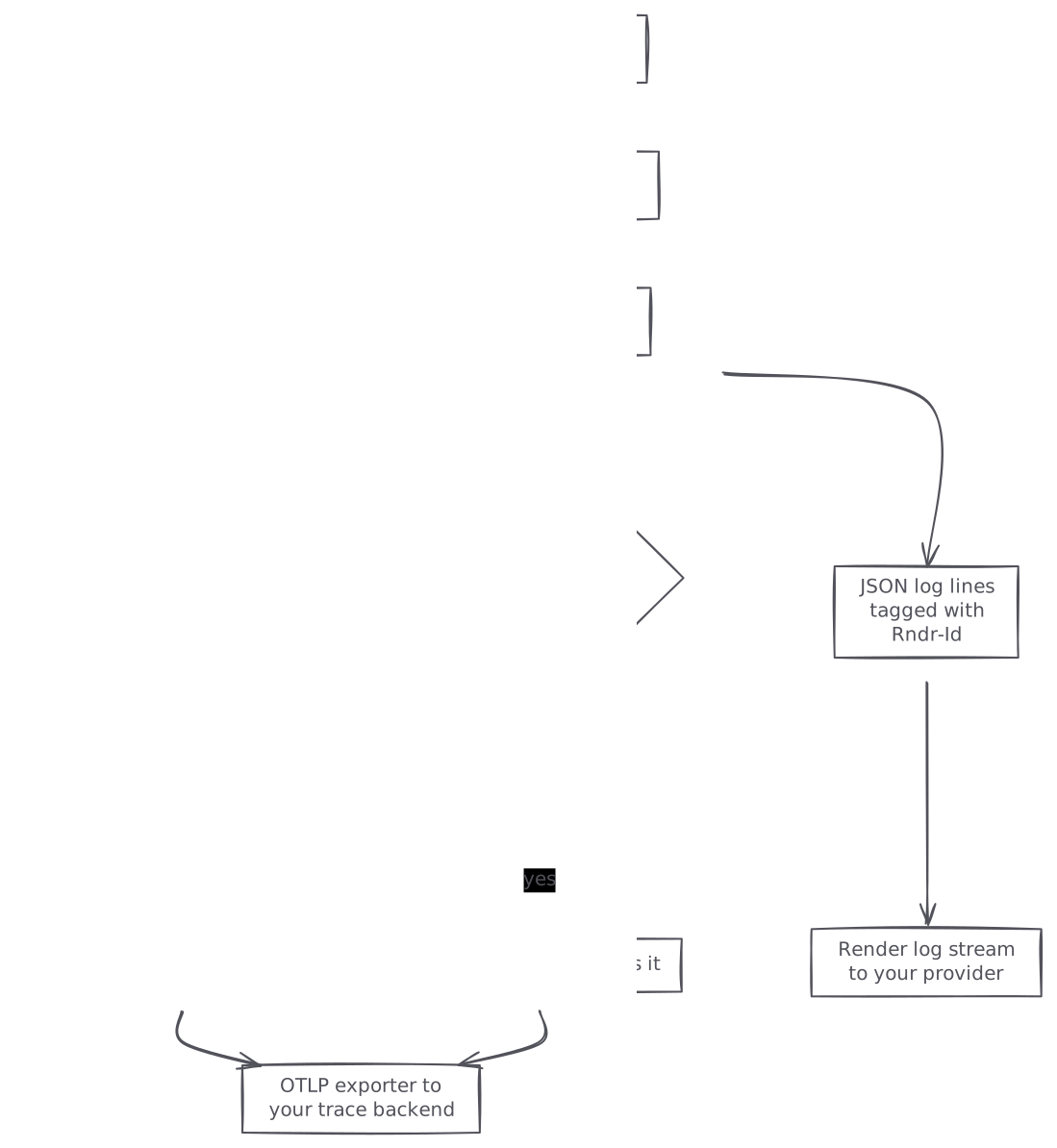
graph TB A[Browser request reaches Render] --> B[Render request log with requestID] B --> C[Next.js server on the web service] C --> D[JSON log lines tagged with Rndr-Id] C --> E[Spans from instrumentation.ts] C --> F{Server error thrown?} F -->|yes| G[onRequestError reports it] D --> H[Render log stream to your provider] E --> I[OTLP exporter to your trace backend] G --> I
Step 1: Give Render a health check that touches the database
By default Render probes a web service with a TCP check on its open port. A Next.js server accepts TCP connections as soon as it boots, even when every page fails because the database URL is wrong. So switch to an HTTP health check with a path that runs a real query.
- Add a route handler at
app/api/health/route.ts:
import { NextResponse } from 'next/server'
import { db } from '@/lib/db'

export const dynamic = 'force-dynamic'

export async function GET() {
  try {
    await db.query('select 1')
    return NextResponse.json({ status: 'ok' }, { status: 200 })
  } catch (err) {
    console.error(JSON.stringify({
      level: 'error',
      msg: 'health check failed',
      error: err instanceof Error ? err.message : String(err),
    }))
    return NextResponse.json({ status: 'degraded' }, { status: 503 })
  }
}- Keep
force-dynamicon the route. Without it, a later change that turns on caching could freeze an oldokresponse, and the check would pass while the database is down. - Set the path in the Render Dashboard under the service’s Settings, Health Checks, or in your Blueprint:
services:
  - type: web
    runtime: node
    name: next-app
    buildCommand: npm ci && npm run build
    startCommand: npm start
    healthCheckPath: /api/health
Render counts a check as passing when the route returns any 2xx or 3xx code within five seconds. A 4xx, a 5xx or a slow answer counts as a failure. If the service has a verified custom domain, Render sends that domain in the Host header of each check. Otherwise it uses the onrender.com subdomain. So if your middleware redirects or blocks unknown hosts, test the health path against both.
What Render does when the health check fails
On a new deploy, Render only moves traffic to the new instances once all of them pass at the same time. If that doesn’t happen within 15 minutes, it cancels the deploy and keeps the old version serving. On a running service, the timeline is shorter:
That makes the health route a real control. A check that’s too strict (for example, one that fails when a third-party API is slow) can take healthy instances out of rotation. Check what your app can’t serve without, which is usually the primary database, and leave optional services out.
Step 2: Log JSON to stdout with Render’s Rndr-Id on every line
Render reads stdout and stderr, so you need no logging SDK. You do need to tie your log lines to the request that produced them. On a Pro workspace or higher, Render writes a request log for each public HTTP request with a requestID field. It sends the same value to your service in the Rndr-Id header and returns it to the client in the response. Put that ID on every line you write during the request, and you can search the log explorer for it and read the request’s whole history in order.
When I built observability for Workers at Cloudflare, the platform’s request ID was the field that made everything else joinable. It’s the first thing I’d add on any host.
A small helper is enough:
// lib/log.ts
type Level = 'debug' | 'info' | 'warning' | 'error'

export function log(level: Level, msg: string, fields: Record<string, unknown> = {}) {
  process.stdout.write(JSON.stringify({
    level,
    msg,
    time: new Date().toISOString(),
    commit: process.env.RENDER_GIT_COMMIT,
    ...fields,
  }) + '\n')
}
Use it in route handlers and Server Actions with the header value:
// app/api/orders/route.ts
import { log } from '@/lib/log'

export async function POST(request: Request) {
  const requestId = request.headers.get('rndr-id') ?? undefined
  const started = Date.now()
  try {
    const order = await createOrder(await request.json())
    log('info', 'order created', { requestId, orderId: order.id, ms: Date.now() - started })
    return Response.json(order, { status: 201 })
  } catch (err) {
    log('error', 'order failed', { requestId, error: String(err) })
    return Response.json({ error: 'failed' }, { status: 500 })
  }
}
In Server Components, read the same header with headers() from next/headers.
The level field matters. Render’s log explorer filters by level, and when you stream logs out as JSON or logfmt, Render maps the level field to the right syslog priority. Without it, Render guesses and defaults to INFO, so your errors can arrive at your provider looking like routine lines.
When you search in the explorer, filters such as level:error, status_code:/5../ and path:api/orders/* work on request logs. To find slow requests, search /responseTimeMS=\d{3}\d+/. That regex matches any request that took more than one second.
Step 3: Catch every server error with onRequestError
A Next.js error that happens inside a Server Component, a Route Handler or a Server Action often reaches the user as a generic error page. Unless you catch it, all you see is a stack trace in stdout. Since Next.js 15, instrumentation.ts can export onRequestError, which the server calls each time it captures an error. It hands you the request path and method, plus context: the router kind, the route file path, and whether the error came from a render, a route handler, a Server Action or the proxy.
Add instrumentation.ts at the project root (or inside src if you use one):
import { type Instrumentation } from 'next'

export const onRequestError: Instrumentation.onRequestError = async (err, request, context) => {
  const message = err instanceof Error ? err.message : String(err)
  const digest =
    typeof err === 'object' && err !== null && 'digest' in err ? String(err.digest) : undefined
  const rndrId = request.headers['rndr-id']

  process.stdout.write(JSON.stringify({
    level: 'error',
    msg: 'next request error',
    error: message,
    digest,
    requestId: Array.isArray(rndrId) ? rndrId[0] : rndrId,
    path: request.path,
    method: request.method,
    routePath: context.routePath,
    routeType: context.routeType,
  }) + '\n')
}
Two details from the Next.js docs matter here. Await anything async inside the hook, or the report may never be sent. And during Server Component rendering, React may process the error, so the error object might differ from the one your code threw. Log the digest: it identifies the error type, so you can group repeats of the same error.
If you use an error tracker, check whether its Next.js SDK can report from this hook. The JSON line above still works as a fallback that needs no vendor.
Step 4: Trace slow requests with OpenTelemetry
Next.js ships with OpenTelemetry built in. It already creates spans for each incoming request ([http.method] [next.route]), for App Router rendering, for every fetch your server code makes, for route handlers, and for generateMetadata. You only have to register a provider and an exporter. The @vercel/otel package works when you host the app yourself, Render included, as well as on Vercel.
- Install the packages:
npm install @vercel/otel @opentelemetry/sdk-logs @opentelemetry/api-logs @opentelemetry/instrumentation- Register it in the same
instrumentation.tsthat holdsonRequestError:
import { registerOTel } from '@vercel/otel'

export function register() {
  registerOTel({ serviceName: 'next-app' })
}- If you need more control, use the Node SDK directly. It doesn’t support the Edge runtime, so load it only when
NEXT_RUNTIMEisnodejs:
// instrumentation.ts
export async function register() {
  if (process.env.NEXT_RUNTIME === 'nodejs') {
    await import('./instrumentation.node')
  }
}
// instrumentation.node.ts
import { OTLPTraceExporter } from '@opentelemetry/exporter-trace-otlp-http'
import { resourceFromAttributes } from '@opentelemetry/resources'
import { NodeSDK } from '@opentelemetry/sdk-node'
import { BatchSpanProcessor } from '@opentelemetry/sdk-trace-node'
import { ATTR_SERVICE_NAME } from '@opentelemetry/semantic-conventions'
const sdk = new NodeSDK({
resource: resourceFromAttributes({
[ATTR_SERVICE_NAME]: 'next-app',
'deployment.commit': process.env.RENDER_GIT_COMMIT ?? 'unknown',
}),
spanProcessor: new BatchSpanProcessor(
new OTLPTraceExporter({ url: process.env.OTLP_TRACES_URL })
),
})
sdk.start()- Set the exporter URL and any auth header as environment variables on the Render service, then redeploy.
- Load a page and look in your backend for a root span named after the route, such as
GET /orders/[id], with render and fetch spans nested under it. Next.js traces more spans than it emits by default. SetNEXT_OTEL_VERBOSE=1while you’re checking the setup to see them all.
You can send OTLP straight to a hosted backend, or run an OpenTelemetry Collector as a Render private service and point the app at it over the private network. The collector route lets you change backends without redeploying the app.
Step 5: Stream logs and metrics out before retention ends
Render’s own retention runs from 7 to 30 days depending on plan, and your other alerts live somewhere else. Send both signals out.
Log streams
From your workspace home, open Integrations, Observability, then Log Streams, and set a default destination. Every supported service starts forwarding. Render sends logs over TLS syslog to most providers, including Better Stack, New Relic, Papertrail, Coralogix and Sumo Logic, and over HTTPS to Datadog and Loggly. Each line carries the service slug, the service type and an instance ID. Log streaming traffic doesn’t count against your outbound bandwidth. Pro workspaces can leave individual services out of the stream, and Scale workspaces can send a service to its own destination.
Metrics streams
On Pro or higher, a workspace admin can open Observability, Metrics Stream and add a destination. Render pushes CPU, memory, disk and other service metrics to an OpenTelemetry endpoint. Better Stack, Grafana, Groundcover, Honeycomb, New Relic, Logfire and SigNoz each have their own form. Datadog receives metrics in its native format. Any other provider works as Custom if it accepts a bearer token in the Authorization header. If yours needs a different kind of auth, put your own OpenTelemetry Collector in front of it.
Step 6: Turn on the Render notifications that matter
Under Integrations, Notifications, set the default to Only failure notifications and connect Slack. At that level Render tells you when:
- a build or deploy fails
- a running service becomes unhealthy (this is the health route from Step 1 at work)
- a cron job run fails
- persistent disk usage passes 80%
- Render suspends a service that keeps failing to start and become healthy over 24 hours
The All notifications level adds successful deploys and recovery messages, but only in Slack. A deploy-live message in the same channel as your alerts makes it easy to see whether a spike started right after a release. If you want to drive your own workflows from these events, Render also offers webhooks.
Step 7: Check the app from outside Render
Render’s health probe runs inside Render. It won’t notice an expired certificate on a custom domain, a DNS mistake, or a page that returns 200 with a broken body. Add one external HTTP check against your public URL. A service such as Hyperping runs checks every 30 seconds with keyword matching and SSL monitoring, and suggests a 2-minute confirmation window so a deploy blip doesn’t page anyone. Assert on a keyword in the response, such as ok from the health route, so an empty 200 still fails.
For the browser side (hydration errors, Core Web Vitals), add a real-user or browser monitoring script. Server-side tooling can’t see a page that rendered fine and then crashed in the client.
The alerts worth having for Next.js on Render
Once the data is flowing, keep the alert list short:
- Service unhealthy from Render notifications. This is your first page.
- Deploy failed from Render notifications, to Slack.
- 5xx rate on public requests, built from the request logs or the HTTP metrics in your provider. Group by path so one broken route stands out.
- p99 latency per route from your traces, compared with the same hour the day before.
- New error digests from the
onRequestErrorlines: alert when a digest you haven’t seen before shows up after a deploy. - Memory near the plan limit. Render can show memory as a percentage of your compute plan’s maximum, which is the number to alert on.
- Log volume drops to zero for the service. Silence usually means the stream broke, and a quiet dashboard can look healthy.
Where Next.js monitoring on Render goes wrong
The health route is cached or too shallow
A health route that never hits the database passes while every page fails. A cached one passes forever. Fix: query the database, keep force-dynamic, and return a 503 on failure.
Logging so much that Render drops lines
Render processes at most 6,000 application log lines per minute for each running instance. Lines above that are dropped, and they never reach the explorer or your log stream. A Next.js app that logs every fetch or every render can hit this under load, and the lines you lose are the ones from the busiest minute. Fix: log one structured line per request plus errors, and put per-call detail in spans.
Expecting request logs for internal traffic
Request logs and the HTTP metrics graphs only cover requests from the public internet. Calls from another Render service over the private network don’t appear. Fix: if a worker or API service calls your Next.js app privately, log those requests yourself or trace them.
Loading the Node SDK in the Edge runtime
NodeSDK isn’t compatible with the Edge runtime, so importing it at the top of instrumentation.ts can break middleware or edge routes. Fix: import it inside the NEXT_RUNTIME === 'nodejs' branch, or use @vercel/otel, which supports both.
Errors that arrive at INFO level
Plain-text console.error output has no level field Render can read, so it may stream out as INFO and slip past your error alerts. Fix: write JSON with a level field on every line.
Waiting to set up streaming until you need old logs
Logs past your plan’s retention are gone, and upgrading doesn’t restore them. Fix: set up the log stream on day one, even to a cheap archive.
Watching a Next.js service on Render with Polylane
If you’d rather not wire every check by hand, Polylane detects production issues and fixes them by opening pull requests. It connects to Render, so when a Next.js service breaks, it works out why, and the fix arrives ready for your team’s normal review.
Running on Render? See how Polylane monitors Render in production.
Common questions.
Does Render monitor my Next.js app automatically?
Partly. A Render web service gets runtime logs from stdout and stderr, CPU and memory graphs, HTTP request volume and a TCP health probe by default. It doesn't see inside requests, so you add an HTTP health route, structured logs, onRequestError and OpenTelemetry for errors and traces.
Why don't I see any logs for my Next.js site on Render?
You probably deployed it as a static site. Render doesn't emit logs for static sites, and metrics streaming doesn't cover them. Deploy as a web service running next start if you need server logs, or rely on external uptime and browser monitoring for a fully static export.
How long does Render keep logs and metrics?
7 days on Hobby, 14 days on Pro and 30 days on Scale and Enterprise, for both logs and metrics. Logs past that window are gone even if you upgrade later. To keep them longer, set up a log stream to Better Stack, Datadog, New Relic, Papertrail or another syslog provider.
What should the health check path be for Next.js on Render?
A route handler such as app/api/health/route.ts that runs a simple database query and returns 200, or 503 when the query fails. Render treats any 2xx or 3xx answer within five seconds as healthy. Set it with healthCheckPath in render.yaml or under Health Checks in the service settings.
Can I get p99 latency for my Next.js routes on Render?
Render's Response Times graph shows p50, p75, p90 and p99 on Pro workspaces and higher, for the whole service. For per-route latency, use the OpenTelemetry spans Next.js emits, which carry the route pattern in next.route, and build the percentiles in your trace backend.
Does OpenTelemetry work for Next.js outside Vercel?
Yes. The Next.js docs say @vercel/otel works both on Vercel and self-hosted, and Next.js already creates spans for requests, rendering, fetch calls and route handlers. Register it in instrumentation.ts and point the exporter at your backend or at an OpenTelemetry Collector.
Can I send Render metrics to Datadog or Grafana?
Yes, on a Pro workspace or higher. A workspace admin adds a destination under Observability, Metrics Stream. Datadog receives metrics in its native format, and Grafana, Honeycomb, New Relic, SigNoz and others receive OpenTelemetry metrics.
Sources (11)
- Service Metrics, Render Docs
- Health Checks, Render Docs
- Logs in the Render Dashboard, Render Docs
- Streaming Render Service Logs, Render Docs
- Streaming Render Service Metrics, Render Docs
- Email and Slack Notifications, Render Docs
- How to set up instrumentation with OpenTelemetry, Next.js
- instrumentation.js API reference, Next.js
- Monitor Next.js, Hyperping
- Render integration, Polylane Docs
- Polylane Docs full text
Boris Tane is the founder of Polylane. He previously founded Baselime, observability for the future of the cloud, which Cloudflare acquired. At Cloudflare he built and led the Workers observability team.
More in this series
- 1 How to Monitor a Django App on Render
- 2 How to Monitor a FastAPI App on Railway: Logs, Traces and Alerts
- 3 How to Monitor a Supabase App in Production
- 4 How to Debug Cloudflare Workers Errors: Logs, Traces and Error Codes
- 5 How to debug Vercel function timeouts
- 6 Vercel 504 Gateway Timeout on Serverless Functions: Causes and Fixes
- 7 Cloudflare Workers error 1101: causes and how to fix it
- 8 Cloudflare Hyperdrive connection errors: causes and fixes
- 9 How to Monitor a Convex App in Production
- 10 How to roll back a Cloudflare Workers deployment
- 11 How to Monitor Vercel Cron Jobs: Heartbeats, Logs and Alerts
- 12 How to reduce Vercel Function cold starts
- 13 How to Monitor a Next.js App on Render
- 14 Modal container out of memory: find the cause and fix it
- 15 Fix Railway “Healthcheck failed!” on deploy
Related
- What a SaaS Startup Should Monitor in Production What to monitor in production at a SaaS startup: outside uptime checks, per-route errors and latency, the database, background jobs, sign-in and tenants.
- Fix Render “Port scan timeout reached, no open ports detected” Why a Render deploy fails with “Port scan timeout reached, no open ports detected”, how to spot the cause in the logs, and how to bind to 0.0.0.0 on PORT.
- How to correlate incidents with deploys using evidence Learn how to correlate incidents with deploys using release markers, metrics, logs and verified GitHub, Vercel, Cloudflare and Kubernetes change events.
- Fix “TypeError: fetch failed” on Vercel and Next.js Why Node.js throws TypeError: fetch failed on Vercel, how to read err.cause to find the real error, and how to fix localhost fetches, bad URLs and timeouts.
- Fix Vercel “FUNCTION_INVOCATION_FAILED” 500 errors Why a Vercel Function returns 500 FUNCTION_INVOCATION_FAILED, how to find the crash in runtime logs, and how to fix throws, missing env vars, files and memory.